
Emi Space
SEO is a set of tools for managing, promoting and optimizing websites.
This is a comprehensive development and promotion of a website to bring it to the top positions in
search engine results for selected queries to increase traffic.
The higher the site's position in search results, the more users visit it. User behavior, user-friendliness, and site loading speed are extremely important for promotion results. With the development and complexity of algorithms, the importance of the above factors is steadily increasing, which ultimately makes search results higher quality.
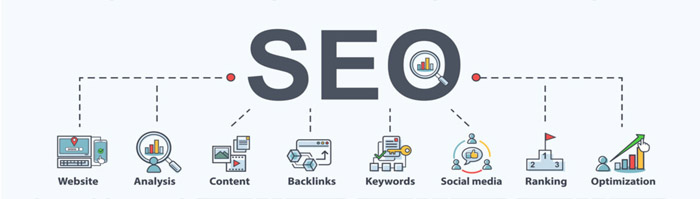
SEO specialists conditionally divide optimization methods into white, gray and black, depending on whether the
rules of search engines are followed. Any of the methods involves the use of techniques that directly or indirectly
affect the work of robots.
White optimization is working on a resource without using officially prohibited promotion methods that
could affect search algorithms.
Gray methods are usually not spoken of as officially prohibited; but their use can be regarded as an
unnatural increase in popularity. Some search engines block such sites.
Black optimization includes methods that contradict the rules. The risk of falling under filters and
sanctions of search engines is very high.
Internal optimization is the most labor-intensive work, it must be carried out constantly. It is internal optimization that should be considered as the key factor in the success of your project.
External optimization is the growth of the link mass, i.e. obtaining links to your site from other resources.
In the conditions of the tightening of the fight of search engines with links, the main problem is the selection of a
good donor site. The best results are given by links from trusted thematic, non-spammed sites.
In the process of external optimization, a list of "donors" is formed, link texts and near-link environment are developed,
after which they are posted.
1. htaccess, sitemap.xml, robots.txt - All these tools will help you create a website and index it on the Internet.
Keyword check - will help you to select the necessary keywords from the text of the site content, in the Keywoods tag, despite the fact that Google officially refused Keywoods tags, bots still continue to index this tag.
Link checking and analysis will provide a report on broken links, indexed links, and the number of links on your site in various search engines (google, yahoo, msn, etc.).

.htaccess rules are a powerful way to control how your website behaves. It can be used to set pretty URLs, define error pages, restrict access and more. There are plenty of guides available to teach you everything that can be done with .htaccess.
Create the .htaccess file in your htdocs directory
Every domain name on your account has a htdocs directory. Your first domain is attached to the folder htdocs/ and addon domains and subdomains are linked to folders like example.com/htdocs/. In these folders, you can create a new file with the name .htaccess. In this file, you can put your .htaccess rules.
Most scripts already include a .htaccess file. In that case, you can edit the file which is already in your website folder instead of creating a new one. Don’t edit the main .htaccess file.
The root folder of your account also contains a .htaccess file. You should not (and generally cannot) edit that file.
The rules inside the main .htaccess file set some defaults for directory indexing and error pages. If you don’t like their behavior, you can override all rules in the file using your own .htaccess file in the htdocs folder of your website.

htaccess file is an additional configuration (service) file (text file) that can be used to manage server settings.
It is used if a web server is used. Despite the unusual name, you can create and edit the file in any text editor.
What can the additional htaccess configuration file do:
What is a Sitemap?
If you don't have a Sitemap, it doesn't mean that search engines won't index the resource.
Search engines often scan sites well enough and include them in the search. But sometimes there may be
failures, due to which it is sometimes possible to find not all web documents.
A Sitemap is a file with links to the pages of a site, which informs search engines about the current
structure of the site, in other words, it is a sitemap only for search bots in XML format.
XML Map - Needed for search bots, it is important for SEO, as it helps bots index the pages of the resource.
The presence of this file tells search bots how exactly the structure of the site is organized.
Robots.txt is a text file that contains site indexing parameters for search engine robots.
The robots.txt file is primarily used to manage search engine robot traffic on your site.
The robots.txt file contains instructions that tell search engine robots which URLs on your site
they are allowed to crawl. It can be used to limit the number of crawl requests and thus reduce the
load on your site.

How to verify your website in Google Search Console
Google Search Console is a useful tool to help you learn about how your website is being crawled by
Google and change settings as to how Google indexes your website.

If you follow all the listed points, then the information on the site will always stay in trend in Google search.
Cyber security is the practice of protecting critical systems and sensitive information from digital attacks.
Cyber security measures, known as information technology security, are designed to combat threats
to networked systems and applications, whether those threats originate from within or outside the organization.

Secure, uninterrupted hosting with endless possibilities
Support us: question@emi-space.com
E-mail us: support@emi-space.com