Tutorial on Server

Dear friends! We try to provide maximum assistance to our visitors.
This section will be improved, but today we are ready to provide you with answers to important questions.

The term "RAID" was coined in 1987
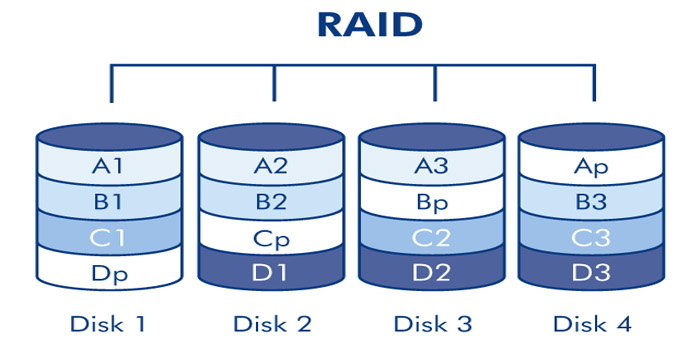
Possible server configurations by RAID ...
(RAID) Possible server configurations using RAID ...

The term "RAID" was proposed in 1987 by Petterson (David A. Patterson), Gibson (Garth A. Gibson) and Katz (Randy H. Katz) as an abbreviation for the English Redundant Array of Inexpensive Disks ("redundant array of inexpensive disks").

  • Possible using RAID ...
    • In their presentation, they argued for their invention with the relatively low cost of an array of cheap disks designed for personal computers, in comparison with high-capacity disks, which they called «SLED» (Single Large Expensive Drive).

      Later, the interpretation of the term changed to Redundant Array of Independent Disks (redundant array of independent Disks (independent) disks), because expensive server disks were often used in arrays.
    • RAID 0
      • RAID 0 (striping — "striping") is a disk array of two or more hard drives without redundancy. The information is divided into fixed-length data blocks and written to both/several disks in turn, that is one block to the first disk, and the second block to the second disk, respectively.

        The level is based on the division of information into blocks with simultaneous recording of different blocks on different disks. The technology significantly increases the speed of reading and writing, while the user can use the total the volume of all drives. There is one drawback — fault tolerance tends to zero, i.e. to restore the damaged HDD/SSD will no longer be possible.

        To implement such a solution, you need at least 2 disks.
    • RAID 1
      • RAID 1 (mirroring— is an array of two disks that are complete copies of each other. Not to be confused with RAID 1+0 (RAID 10), RAID 0+1 (RAID 01) arrays, which use more complex mirroring mechanisms.

        This method is already based on the complete duplication of data into several media. The principle is steep and reinforced concrete in terms of reliability, but when using two disks with a capacity of 2 TB, you you get only one worker. The second one becomes invisible to the system — only to the RAID controller. The process also does not provide any advantages in speed, but fault tolerance increases several times. If one of the HDD/SSD has been ordered to live for a long time, its full cast is on the second medium.

        The processes of writing, deleting and copying occur in parallel. There is one caveat from this: the information has been erased from one HDD, it disappears automatically on the second one.

        To implement such a solution, you need at least 2 disks.
    • RAID 2
      • RAID 2 arrays of this type are based on the use of Hamming code. Disks are divided into two groups: for data and for error correction codes, and if the data is stored on two disks, then it is necessary to store correction codes at least three disks. The total number of disks in this case will be equal to three disks. The data is distributed across the disks intended for storing information in the same way as in RAID 0, that is, they are divided into small blocks according to the number of disks.

        The remaining disks store error correction codes, according to which, in case of failure of any hard disk, it is possible information recovery.

        To implement such a solution, you need at least 3 disks.
    • RAID 3
      • In a RAID 3 disk array, data is split into chunks smaller than a sector (split into bytes) and distributed on two disks. Another disk is used to store parity blocks.

        This unified format for organizing a disk array uses striping and allocates one disk from an available pool storage devices for storing parity information, which is responsible for checking the integrity by determining whether data was lost or overwritten when it was directly moved from one storage location to another or at the time of transfer between computers.

        To implement such a solution, you need at least 3 disks.
    • RAID 4
      • RAID 4 is similar to RAID 3, but differs from it in that data is split into blocks, not bytes. Thus, it was partially possible to "defeat" the problem of low data transfer rate of a small volume. The recording is being made it is slow due to the fact that the parity for the block is generated during recording and is written to a single disk.

        To implement such a solution, you need at least 3 disks.
    • RAID 5
      • RAID 5 is a disk array with alternating data blocks and parity control. The main disadvantage of RAID levels from 2nd to 4th is the inability to produce parallel write operations, since a separate control disk is used to store parity information.

        RAID 5 does not have this disadvantage. Data blocks and checksums are cyclically written to all disks of course, there is no asymmetry in the disk configuration. The technology is considered one of the most widespread and safe, because it works on the principles of parity and alternation. To create a fifth Raid, you must have at least 3 disks.

        During recording, the data is divided into blocks, with a special condition: to one of the disks, called a block parity (Parity Drive/PD) information is written for further recovery. In case something went wrong by the fault of the user, or the obsolescence of the drives as a whole.

        The convenience of RAID 5 is that it can be implemented both hardware and software using the appropriate utilities supplied with the OS. However, any intelligent specialist will say that the hard-core option is much safer.

        To implement such a solution, you need at least 4 disks.
    • RAID 6
      • RAID 6 is an array of four or more disks with P+Q or DP parity checking, designed to protect from data loss when two hard drives in the array fail at once. This reliability is achieved by due to reduced performance and reduced capacity, two steps are needed to restore information computing operations, and two disks in the array are not used to store data, but to control them integrity and failure recovery.

        In many ways, this technology duplicates the features of RAID 5, but the data for recovery is copied to two backup media at once. The second parity disk is, in fact, a duplicate link, to be sure. The principle of its operation is based on the Reed-Solomon code, and therefore the second drive is labeled as Q or RS.

        Thanks to this principle, the server owner can painlessly transfer the untimely death of a pair of HDD/SSD at once. That's just for the implementation of RAID 6, you will need 4 disks already.
    • RAID 7
      • RAID 7 is a registered trademark of Storage Computer Corporation, a separate level RAID is not. The structure of the array is as follows: two disks store data, one disk is used for storage blocks of parity. Writing to disks is cached using RAM, the array itself requires mandatory UPS; in case of power outages, data corruption occurs.

        To implement such a solution, you need at least 2 disks.
    • RAID 10
      • RAID 10 (RAID 1+0) is a mirrored array in which data is written sequentially to several disks, as in RAID 0. This architecture is a RAID 0 array, the segments of which are RAID 1 arrays instead of individual disks. Accordingly, an array of this level must contain at least 4 disks (and always an even number). RAID 10 combines into high fault tolerance and performance.

        This technology combines the advantages of RAID 1 and RAID 0 in virtualization mode, which provides high speed recovery, excellent reliability and performance.

        RAID 10 is a nested RAID type that combines RAID 1 and RAID 0, hence its name. Many professionals they prefer to write it as RAID 1+0. The array first splits the data into blocks (RAID 0), and then creates for them mirroring on separate disks (RAID 1). Remember, this is not the same as RAID 0 + 1, which works in the opposite direction, first creating a mirror image of the data, and then splitting it into blocks.

        To implement such a solution, you need at least 4 disks.
    • RAID 50
      • This configuration takes all the advantages of RAID 5 (parity) and RAID 0 (striping) to improve performance without reducing protection indicators. But only if you have 6 disks or more.

        RAID organization allows you to survive a breakdown of up to 4 disks if they are hanging in a separate RAID 5 array. To implement such a solution, you need at least 6 disks.
    • RAID 60
      • RAID 60 (also called RAID 6+0) is a combined set of RAID 0 and RAID 6 arrays, offering the user improved performance and processing speed of the array data. This combination has not been widely used, but it has some advantages, among which it is especially possible to highlight the possibility of maintaining operability (no delays in calculating and writing a large number of parity bits) while increasing the total volume in parallel spaces.

        Striping ("striping") helps to increase throughput and performance without adding additional disks are attached to each RAID 6 set, which, in turn, reduces data availability. RAID 60 increases performance RAID 6, despite the fact that RAID 60 is noticeably slower than RAID 50, especially in terms of "writing" data.

        To implement such a solution, you need at least 8 disks.
  • Lifecycle Controller (LCC)
    • LCC Dell PowerEdge
      • The Dell PowerEdge server management solution is based on an integrated Lifecycle Controller (LCC). LCC is a lightweight operating system that runs from iDRAC to receive instructions from the systems management.

        It also serves as a direct point for updates and helps to perform automated tasks in in accordance with the instructions for creating and maintaining workable servers.
    • The controller iDRAC
      • The iDRAC controller is hardware integrated into the server motherboard and, like other BMC solutions, has its own processor, memory, network connection and access to the system bus.

        iDRAC provides remote access to the system console (keyboard and screen), allowing access to the BIOS systems over the Internet when the server is restarted. The main functions of iDRAC include power management, access to virtual media and remote console capabilities. These functions give administrators the ability to customize the computer is as if they were sitting in front of a local console.

HTTP Server Headers

HTTP Headers
HTTP Headers are lines in an HTTP message

HTTP Headers are lines in an HTTP message that contain a colon-separated name-value pair. The format of the headers follows the ARPA General Format for Text Network Message Headers. Headers must be separated from the message body by at least one blank line.

  • HTTP Server Headers
    • List of HTTP status codes
      • HTTP status code is part of the first line of the server response. It is an integer of three Arabic numerals. The first digit indicates the status class. The response code is usually followed by an explanatory phrase in English, separated by a space, which explains to the person the reason for this particular response.
    • 1xx: Informational
      • 100 Continue — The server is satisfied with the initial request information, the client may continue to forward headers. Introduced in HTTP/1.1.

        101 Switching Protocols — The server is offering to select a different protocol that is more appropriate for the resource. The protocols offered by the server are specified in the Update header line, if the server's proposed protocol is acceptable to the client, it sends a new request specifying the new protocol. Introduced in the protocol version HTTP/1.1.

        102 Processing — The request has been accepted, but it will take a long time to process. Used by the server to prevent the client from disconnecting due to a timeout. When the client receives such a response, it should reset the timer and wait for the next command as normal. Introduced in WebDAV.

        105 Name Not Resolved - An error occurred while resolving the domain name due to an invalid or missing DNS server IP address.
    • 2xx: Success
      • 200 OK — A successful request. If the client requested any data, it is in the header and/or body of the message. Introduced in HTTP/1.0.

        201 Created — As a result of the successful execution of the request, a new resource was created. The server should specify its location in the Location header. The server is also recommended to specify the characteristics of the created resource in the header (for example, in the Content-Type field).

        If the server is not sure that the resource will actually exist by the time the client receives this message, it is better to use a response with the 202 code. Introduced in HTTP/1.0.

        202 Accepted — The request was accepted for processing, but it is not complete. The client does not have to wait for the final transmission of the message, since a very long process may be started. Introduced in HTTP/1.0.

        203 Non-Authoritative Information — Similar to 200, but in this case the information provided was not taken from the primary source (backup, another server, etc.) and may therefore be outdated. Introduced in HTTP/1.1.

        204 No Content — The server successfully processed the request, but the response included only headers without a message body. The client should not update the document content, but may apply the received metadata to it. Introduced in HTTP/1.0.

        205 Reset Content — The server requests that the client reset the user-entered data. The server does not transmit the message body, and the document does not need to be updated. Introduced in HTTP/1.1.

        206 Partial Content — The server successfully completed a partial GET request, returning only part of the message. The server specifies the byte ranges of the content in the Content-Range header. Special attention should be paid to caching when working with such responses. Introduced in HTTP/1.1.

        207 Multi-Status — The server transmits the results of several independent operations at once. They are placed in the message body itself as an XML document with the multistatus object. It is not recommended to place 1xx series statuses in this object because they are meaningless and redundant. Introduced in WebDAV.

        226 IM Used — The A-IM header from the client was successfully received and the server returns the content taking into account the specified parameters. Introduced in RFC 3229 to extend the HTTP protocol with support for delta encoding.
    • 3xx: Redirection
      • 300 Multiple Choices — The specified URI has several possible resources, based on MIME type, language, or other characteristics. The server passes a list of alternatives with the message, allowing the client to make a selection automatically or the user to do so. Introduced in HTTP/1.0.

        301 Moved Permanently — The requested document has been permanently moved to a new URI, specified in the Location header field. Some clients behave incorrectly when processing this code. Introduced in HTTP/1.0.

        302 Moved Temporarily / Found — The requested document is temporarily available at a different URI, specified in the Location header field. This code can be used, for example, in server-driven content negotiation. Some clients behave incorrectly when processing this code. Introduced in HTTP/1.0.

        303 See Other — The document at the requested URI should be requested using the address in the Location header field using the GET method, even though the first resource was requested using a different method. This code was introduced along with 307 to avoid ambiguity, so that the server can be sure that the next resource will be requested using the GET method.

        For example, a web page has a text input field for quick navigation and searching. After entering the data, the browser makes a POST request, including the entered text in the message body.

        If a document with the entered name is found, the server responds with code 303, specifying its permanent address in the Location header. Then the browser is guaranteed to request it using the GET method to obtain the contents. Otherwise, the server will simply return the page with the search results to the client. Introduced in HTTP/1.1.

        304 Not Modified — The server returns this code if the client requested a document using the GET method, used the If-Modified-Since or If-None-Match header, and the document has not changed since the specified time. In this case, the server message must not contain a body. Introduced in HTTP/1.0. Check the 304 Not Modified code.

        305 Use Proxy — The request to the requested resource must be made through a proxy server whose URI is specified in the Location field of the header. This response code may only be used by original HTTP servers (not proxies). Introduced in HTTP/1.1.

        306 (Reserved, code only used in earlier specifications) — A previously used response code, currently reserved. Mentioned in RFC 2616 (HTTP/1.1 update).

        307 Temporary Redirect -- The requested resource is available for a short time at a different URI, specified in the Location header field. This code was introduced along with 303 instead of 302 to avoid ambiguity. Introduced in RFC 2616 (HTTP/1.1 update).
    • 4xx: Client Error
      • 400 Bad Request — The server detected a syntax error in the client's request. Introduced in HTTP/1.0.

        401 Unauthorized — Authentication is required to access the requested resource. The response header must contain the WWW-Authenticate field with a list of authentication conditions. The client can repeat the request, including the Authorization message header with the data required for authentication.

        402 Payment Required — Expected to be used in the future. Currently not used. This code is intended for paid user services, not for hosting companies. It is implied that this error will not be returned by the hosting provider in case of late payment for its services. Reserved since HTTP/1.1.

        403 Forbidden — The server understood the request, but it refuses to fulfill it due to restrictions on the client's access to the specified resource. If authentication by HTTP is required to access the resource, the server will return a 401 or 407 response when using a proxy. Otherwise, the restrictions were set by the server administrator or the web application developer and can be anything depending on the capabilities of the software used.

        In any case, the client should be informed of the reasons for refusing to process the request. The most likely reasons for the restriction may be an attempt to access system resources of the web server (for example, .htaccess or .htpasswd files) or files that were closed using configuration files, a requirement for authentication by non-HTTP means, for example, to access the content management system or a section for registered users, or the server is not satisfied with the client's IP address, for example, during blocking. Introduced in HTTP/1.0.

        404 Not Found - The most common error when using the Internet, the main reason is an error in writing the address of the Web page. The server understood the request, but did not find the corresponding resource at the specified URI. If the server knows that there was a document at this address, it is advisable for it to use the 410 code. The 404 response can be used instead of 403 if it is necessary to carefully hide certain resources from prying eyes. Introduced in HTTP/1.0.

        405 Method Not Allowed — The method specified by the client cannot be applied to the current resource. The server must specify the available methods in the Allow header in the response, separated by a comma. The server must return this error if the method is known to it, but it is not applicable to the resource specified in the request. If the specified method is not applicable to the entire server, then the client must return the code 501 (Not Implemented). Introduced in HTTP/1.1.

        406 Not Acceptable — The requested URI cannot match the characteristics passed in the header. If the method was not HEAD, then the server must return a list of acceptable characteristics for this resource. Introduced in HTTP/1.1.

        407 Proxy Authentication Required — The response is similar to the 401 code, except that authentication is performed for the proxy server. The mechanism is similar to identification on the original server. Introduced in HTTP/1.1.

        408 Request Timeout — The server has timed out waiting for the client to send a request. The client can repeat a similar request at any time. For example, this situation may occur when uploading a large file to the server using the POST or PUT method. At some point in the transfer, the data source stopped responding, for example, due to damage to the CD or loss of communication with another computer on the local network. While the client does not transmit anything, waiting for a response from it, the connection to the server is maintained.

        After some time, the server may close the connection on its side to allow other clients to make a request. This response is not returned when the client forcibly stops the transfer at the user's command or the connection is interrupted for some other reason, since it is no longer possible to send a response. Introduced in HTTP/1.1.

        409 Conflict — The request cannot be completed due to a conflicting access to the resource. This is possible, for example, when two clients try to change a resource using the PUT method. Introduced in HTTP/1.1.

        410 Gone — The server sends such a response if the resource was previously at the specified URL, but was deleted and is now unavailable. In this case, the server also does not know the location of an alternative document, for example, a copy). If the server suspects that the document may be restored in the near future, it is better to send the 404 code to the client. Introduced in HTTP/1.1.

        411 Length Required — For the specified resource, the client must specify Content-Length in the request header. Without specifying this field, you should not retry the request to the server at this URI. This response is natural for requests such as POST and PUT. For example, if files are uploaded at the specified URI, and the server has a limit on their size. Then it would be wiser to check the Content-Length header at the very beginning and immediately refuse to download, than to provoke a meaningless load by breaking the connection when the client actually sends too large a message. Introduced in HTTP/1.1.

        412 Precondition Failed — Returned if none of the conditional request header fields were satisfied. Introduced in HTTP/1.1.

        413 Request Entity Too Large — Returned if the server refuses to process the request due to the request body being too large. The server may close the connection to stop transmitting the request further. If the problem is temporary, it is recommended to include the Retry-After header in the server's response indicating the time after which a similar request can be repeated. Introduced in HTTP/1.1.

        414 Request-URI Too Large — The server cannot process the request because the specified URL is too long. This error can be caused, for example, when a client tries to pass long parameters via the GET method, rather than POST. Introduced in HTTP/1.1.

        415 Unsupported Media Type — For some reason, the server refuses to work with the specified media type for this method. Introduced in HTTP/1.1.

        416 Requested Range Not Satisfiable — The Range field of the request header specified a range beyond the end of the resource, and the If-Range field was missing. If the client sent a byte range, the server MAY return the actual size in the Content-Range field of the header. This response should not be used when sending multipart/byteranges. Introduced in RFC 2616 (HTTP/1.1 update).

        417 Expectation Failed — For some reason, the server could not satisfy the value of the Expect request header field. Introduced in RFC 2616 (HTTP/1.1 update).

        418 I'm a teapot — This code was introduced in 1998 as one of the traditional IETF April Fools' jokes in RFC 2324, Hyper Text Coffee Pot Control Protocol. It is not expected that this code will be supported by real servers.

        422 Unprocessable Entity — The server successfully accepted the request, can work with the specified data type, the XML document in the request body has the correct syntax, but there is some logical error that prevents the operation on the resource. Introduced in WebDAV.

        423 Locked — The target resource in the request is locked from being applied to the specified method. Introduced in WebDAV.

        424 Failed Dependency — The current request may depend on another operation being successfully completed. If it fails and the current request cannot be completed, the server will return this code. Introduced in WebDAV.

        425 Unordered Collection — Used in the WebDAV Advanced Collections Protocol extension. Sent if the client specified an item number in an unordered list, or requested multiple items in an order different from the server's.

        426 Upgrade Required — The server indicates to the client that a protocol upgrade is required. The response header must contain well-formed Upgrade and Connection fields. Introduced in RFC 2817 to enable the transition to TLS over HTTP.

        428 Precondition Required — The server indicates to the client that it should use conditional headers in the request, such as If-Match. Introduced in RFC 6585 draft.

        429 Too Many Requests — The client attempted to send too many requests in a short time, which may indicate, for example, a DoS attack. May be accompanied by a Retry-After header, indicating after how long the request may be retried. Introduced in RFC 6585 draft.

        431 Request Header Fields Too Large — The headers exceeded the allowed length. The server is not required to respond with this code; it may simply reset the connection instead. Introduced in draft RFC 6585.

        434 Requested host unavailable. — The requested address is not available.

        449 Retry With — Returned by the server if there is not enough information from the client to process the request. In this case, the Ms-Echo-Request field is placed in the response header. Introduced by Microsoft for WebDAV. Currently, at least is used by Microsoft Money.

        451 Unavailable For Legal Reasons — Access to the resource is closed for legal reasons, for example, at the request of government authorities or at the request of the copyright holder in the event of copyright infringement. Introduced in the IETF draft by Google, while the error code is a reference to Ray Bradbury's novel "Fahrenheit 451".

        456 Unrecoverable Error - Returned by the server if processing a request causes unrecoverable failures in the database tables. Introduced by Microsoft for WebDAV.

        499 Client Closed Request - Used by Nginx when the client closes the connection before receiving a response.
    • 5xx: Server Error
      • 500 Internal Server Error — Any internal server error that does not fall within the scope of the other errors of the class. Introduced in HTTP/1.0.

        501 Not Implemented — The server does not support the capabilities required to process the request. A typical response for cases when the server does not understand the method specified in the request. If the server knows the method, but it is not applicable to this resource, then a 405 response should be returned. Introduced in HTTP/1.0.

        502 Bad Gateway — The server, acting as a gateway or proxy, received an invalid response message from an upstream server. Introduced in HTTP/1.0.

        503 Service Unavailable — The server is temporarily unable to process requests due to technical reasons (maintenance, overload, etc.). The server may specify a time in the Retry-After header after which the client is advised to repeat the request. Although it may seem obvious to immediately terminate the connection during overload, it may be more effective to set a large Retry-After field to reduce the frequency of redundant requests. Introduced in HTTP/1.0.

        504 Gateway Timeout — The server, acting as a gateway or proxy, did not wait for a response from the upstream server to complete the current request. Introduced in HTTP/1.1.

        505 HTTP Version Not Supported — The server does not support or refuses to support the version of the HTTP protocol specified in the request. Introduced in HTTP/1.1.

        506 Variant Also Negotiates — A misconfiguration causes the selected variant to point to itself, causing the binding process to fail. Experimental. Introduced in RFC 2295 to extend the HTTP protocol with Transparent Content Negotiation.

        507 Insufficient Storage — There is not enough storage to fulfill the current request. The problem may be temporary. Introduced in WebDAV.

        508 Loop Detected — The operation was cancelled because the server encountered an infinite loop while processing a request with no depth limit. Introduced in WebDAV.

        509 Bandwidth Limit Exceeded — Used when the web site exceeds its allocated traffic consumption limit. In this case, the site owner should contact their hosting provider. At the moment, this code is not described in any RFC and is used only by the "bw/limited" module, which is part of the cPanel hosting control panel, where it was introduced.

        510 Not Extended — The server does not have the extension that the client wants to use. The server can additionally transmit information about extensions available to it. Introduced in RFC 2774 to supplement the HTTP protocol with extension support.

        511 Network Authentication Required — This response is sent not by the server to which the request was intended, but by an intermediary server — for example, an ISP server — in cases where the client must first authenticate to the network, such as entering a password for a paid Internet access point. The response body is expected to return a Web authorization form or a redirect to it. Introduced in draft RFC 6585.

HTTP methods

HTTP methods
General HTTP methods

An HTTP method is safe if it does not change the state of the server. In other words, a safe method performs read-only operations. A GET request is sent via an HTML form, and by many other programs, scripts.

  • HTTP methods
    • General HTTP methods
      • The correct implementation of the secure method is the responsibility of the server application, the web server Apache, nginx, IIS itself will not be able to protect. This means that the application should not allow changing the server state by GET requests.
    • Method GET
      • The GET method requests a representation of a resource. Requests using this method can only retrieve data.
    • Method POST
      • The POST method is intended to send data to the server. Often causes a state change or some side effects on the server. The POST request is usually sent via an HTML form, and many other programs, scripts.
    • Method HEAD
      • The HEAD method requests a resource in the same way as the GET method, but without a response body.

        The HTTP HEAD method requests headers identical to those that would be returned if the specified resource were requested using the HTTP GET method. Such a request may be made before downloading a large resource, for example to save bandwidth.

        The response to the HEAD method must not contain a body. If it does not, it should be ignored. Even so, entity headers describing the contents of the body, such as Content-Length, must be included in the response. They do not apply to the body of the response to a HEAD request, which must be empty, but rather to the body of the response received for a similar request using the GET method.
    • Method PUT
      • The PUT method replaces all current representations of a resource with the request data. Typically, PUT creates a new resource or replaces a representation of the target resource with the data provided in the request body.
    • Method DELETE
      • The DELETE method deletes the specified resource. Example of a DELETE header /file.html HTTP/1.1
    • Method CONNECT
      • The CONNECT method establishes a "tunnel" to the server specified by the resource.
    • Method OPTIONS
      • The OPTIONS method is used to describe the connection parameters to a resource.
    • Method TRACE
      • The TRACE method calls the returned test message from the resource.
    • Method PATCH
      • The PATCH method is used to partially modify a resource.

        To indicate that the server supports PATCH, you can add this method to the Allow (en-US) or Access-Control-Allow-Methods (for CORS) response headers.

DNS hosting records
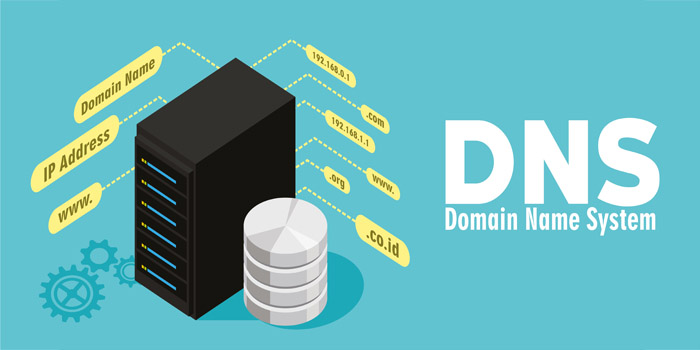
DNS hosting records

DNS (Domain Name System) is the "phone book" of the Internet. It uses IP addresses as phone numbers, and domains as contact names. In such a book, you can enter not only a "phone number", but also additional information about a contact ("e-mail", "place of work", etc.).

  • DNS hosting records

Support

Secure, uninterrupted hosting with endless possibilities

Support us: question@emi-space.com