
Emi Space
We firmly believe in what we do. Without unnecessary modesty, we want to declare that hosting is our calling.
Any site, both large and small, should open quickly from anywhere in the world.
We have been working on this since 1999!
To do this, use the access data from the service instructions or go directly from the billing panel:
Let's consider connecting a free Let's Encrypt certificate using the ISPmanaager control panel using the domain
mydomen.com as an example, instead of it you need to use your domain.
1. In the WWW domains section, select the required domain.
2. Next, you need to check the necessary checkboxes to generate an SSL
certificate and redirect requests to https.
3. Let's go to the SSL Certificates section to see the issuance process
of the current SSL certificate.
4. The SSL certificate is issued successfully when the message "Let's Encrypt certificate
successfully received" appears in the issuance log.
After completing the sequential steps, you can go to the site and see that it opens via the https protocol
with the Let's Encrypt certificate.
To renew the certificate, click the renew button.
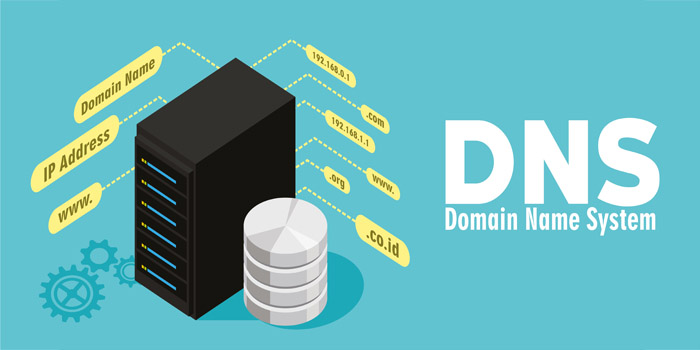
Each virtual hosting client has the ability to edit DNS records of their domain using the "Domain Names" section in the control panel.
You can check if a domain is available for registration using external whois services:
For international domains: http://whois.domaintools.com
Click on the "Login" button, then select the "Remind password" link and enter your email, which you used when registering your account. Within a few minutes, you will receive instructions on how to restore access to your email.
Notifications about the end of funds on your account are sent to your email 10, 5, and then every day until
the expected end date of funds.
Funds are written off daily, so you can top up your account with any amount, but when you extend the service
for a long period, you can get a bonus.
Unfortunately, creating an auto payment is not currently provided, but this may change in the future.
Our - Hosting is an information intermediary and cannot consider disputes between
parties instead of the court, also our hosting does not control and fill any third-party
site and its administration.
If a complaint is received by us from a user about a domain or site hosted by us, we
will send a notification to the owner of the site.
The owner of the site is obliged to take action on the complaint within 24 hours.
If there is no response to the complaint from the owner of the site, we block such a site.

To exchange USDT, LTC, or Paypal, in the payment section there is a description of the payment instructions in the user's personal account.
You can add a subdomain in the "www-domains" section, in the panel. You can also add a subdomain as an alias to the main domain.
On our virtual hosting, PHP version is 7.4. It is not possible to change the PHP version for the site.
To perform import on our hosting, go to the Imported file panel, click the Browse button, specify the dump of the imported database and click OK at the bottom of the page.
You can transfer your domains in international zones (com, org, net, info, etc.) to us and renew them through us. Write to our support service.
To delete your account, please create a support request.
When trying to access your website, you may see a page which returns the status code “500”. In Google Chrome, you’ll see a page with the error code HTTP ERROR 500.
There are typically two reasons which can cause this error:
1.The PHP code has crashed.
2.The .htaccess file contains invalid rules.
Here are some things you can try to debug and fix this.
Write the following in your code:
ini_set('display_errors', 1);
ini_set('display_startup_errors', 1);
error_reporting(1);
If this still doesn’t allow you to see any error messages, please contact the script developers for help.
However, you can remove or rename your .htaccess file (to .htaccess.backup, for example) and refresh the page. If you don’t see the HTTP ERROR 500 anymore, that likely means there was an error in the .htaccess file.
Domain name: domain name website
Registry Domain ID: domain name registry identifier
Registrar WHOIS Server: Whois-registrar service
Registrar URL: Registrar's website address
Creation Date: domain registration date
Updated Date: date of last change of domain information
Registrar Registration Expiration Date: domain registration expiration date according to the Registrar
Registry: domain name registrar (RU-CENTER)
Registry IANA ID: registrar identifier in IANA
Registry Abuse Contact Email: email address for complaints regarding domain names
Registry Abuse Contact Phone: phone number for complaints regarding domain names
Domain Status: status (DELEGATED or NOT DELEGATED, clientTransferProhibited)
Registry Registrant ID: domain administrator identifier
Registry Name: domain administrator name
Registry Organization: domain administrator name
Registry Street: apartment, house number, street
Registry City: city
Registry State/Province: region
Registrant Postal Code: postal code
Registrant Country: country identifier
Registrant Phone: domain administrator's phone number with international code and city code
Registrant Phone Ext: domain administrator's additional phone number with international code and city code
Registrant Fax: domain administrator's fax number with international code and city code
Registrant Fax Ext: domain administrator's additional fax number with international code and city code
Registrant Email: domain administrator's email address
Registry Admin ID: administrative contact ID
Admin Name: administrative contact name
Admin Organization: organization name
Admin Street: apartment, house number, street
Admin City: city
Admin State: region
Admin Postal Code: postal code
Admin Country: country identifier
Admin Phone: phone number with international code and city code
Admin Phone Ext: additional phone number with international code and city code
Admin Fax: fax number with international code and city code
Admin Fax Ext: additional fax number with international code and city code
Admin Email: email address
Registry Tech ID: identifier of the technical contact
Tech Name: name of the technical contact
Tech Organization: name of the organization
Tech Street: apartment, house number, street
Tech City: city
Tech State: region
Tech Postal Code: postal code
Tech Country: country identifier
Tech Phone: telephone number with international code and city code
Tech Phone Ext: additional telephone number with international code and city code
Tech Fax: fax number with international code and city code
Tech Fax Ext: additional fax number with international code and city code
Tech Email: email address
Name Server: list of DNS servers supporting the domain if it is delegated (multi-line field - 1 name server per line;
if the server name contains the domain name, its IP addresses are indicated)
DNSSEC: Availability of a zone signature in accordance with DNSSEC specifications (signedDelegation or unsigned)

Secure, uninterrupted hosting with endless possibilities
Support us: question@emi-space.com
E-mail us: support@emi-space.com